v0.2.0 is out · Free & open source

See how a rapper
rides the beat.

Drop in a track. noCap isolates the vocals, transcribes every word, and places each syllable on the beat grid — so you can see density, syncopation, pocket and rhyme chains bar by bar.

Apple Silicon · Everything bundled · No account, no upload
On an Intel Mac?

Built on
  • OpenAI Whisper
  • Demucs
  • librosa
  • CMU Pronouncing Dict
  • Pixi.js
  • Electron
~10 msword-level timing
8flow metrics per track
100%local — audio never leaves your Mac
MITlicensed, free forever

Watch

noCap in 45 seconds.

Flow map, rhymes, pocket and the report, cut to a 92 BPM beat. Sound on.

What it answers

Questions you used to answer by ear.

Flow is the hardest part of rap to put into words. noCap turns it into something you can point at.

Density

How dense is the flow?

Every bar is a row, every beat a column. Syllables land exactly where they were rapped, so double-time runs, triplets and breathing room are obvious at a glance.

  • Syllables per beat, per bar and per section
  • Peak and average density, bar-by-bar ranking
  • Syncopation score — how often you land off the grid
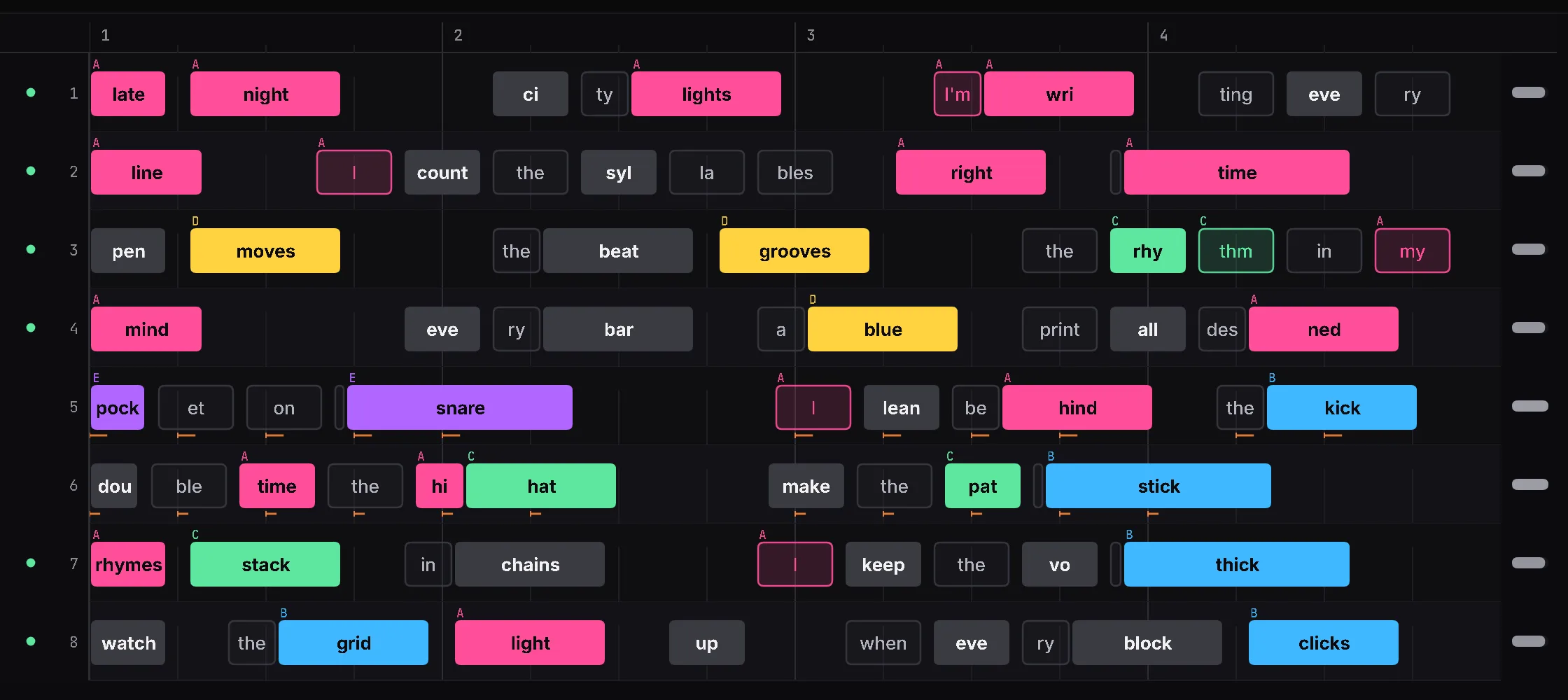
Close-up of the flow grid: syllable blocks with their text, placed within each beat of each bar and colored by rhyme group.
Pocket

Ahead, on, or behind the beat?

noCap measures each syllable's offset from the grid, then summarizes it as pocket and timing quality — the difference between laid-back and rushing, in numbers.

  • Pocket score with average and range of offsets
  • Timing variance and delivery consistency
  • Compare bars by density, sync, stress, pocket or timing
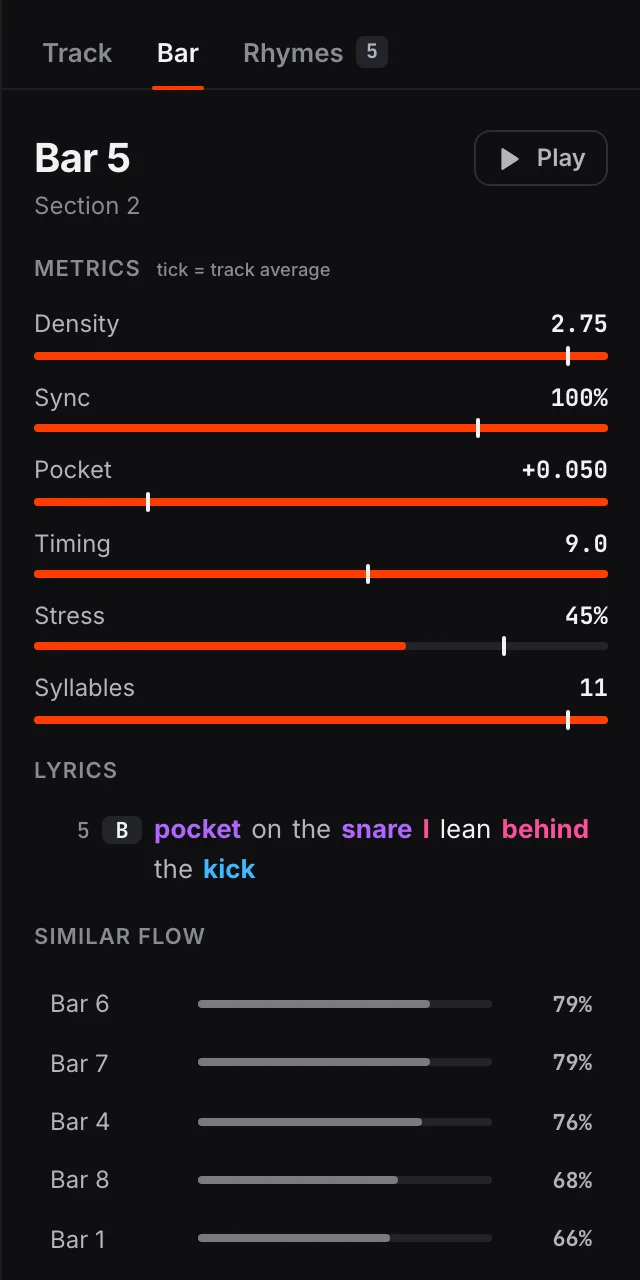
Inspector for bar 5: density, sync, pocket, timing and stress against the track average, the bar's lyrics colored by rhyme group, and bars with a similar flow.
Rhymes

Where do the rhymes land?

Phonetic matching groups perfect, slant, assonance and internal rhymes, then color-codes them on the grid. Follow a rhyme chain across bars and see how the scheme is built.

  • Multi-syllable and internal rhyme detection
  • Click a group to highlight it across the whole track
  • Average rhyme-chain length as a metric
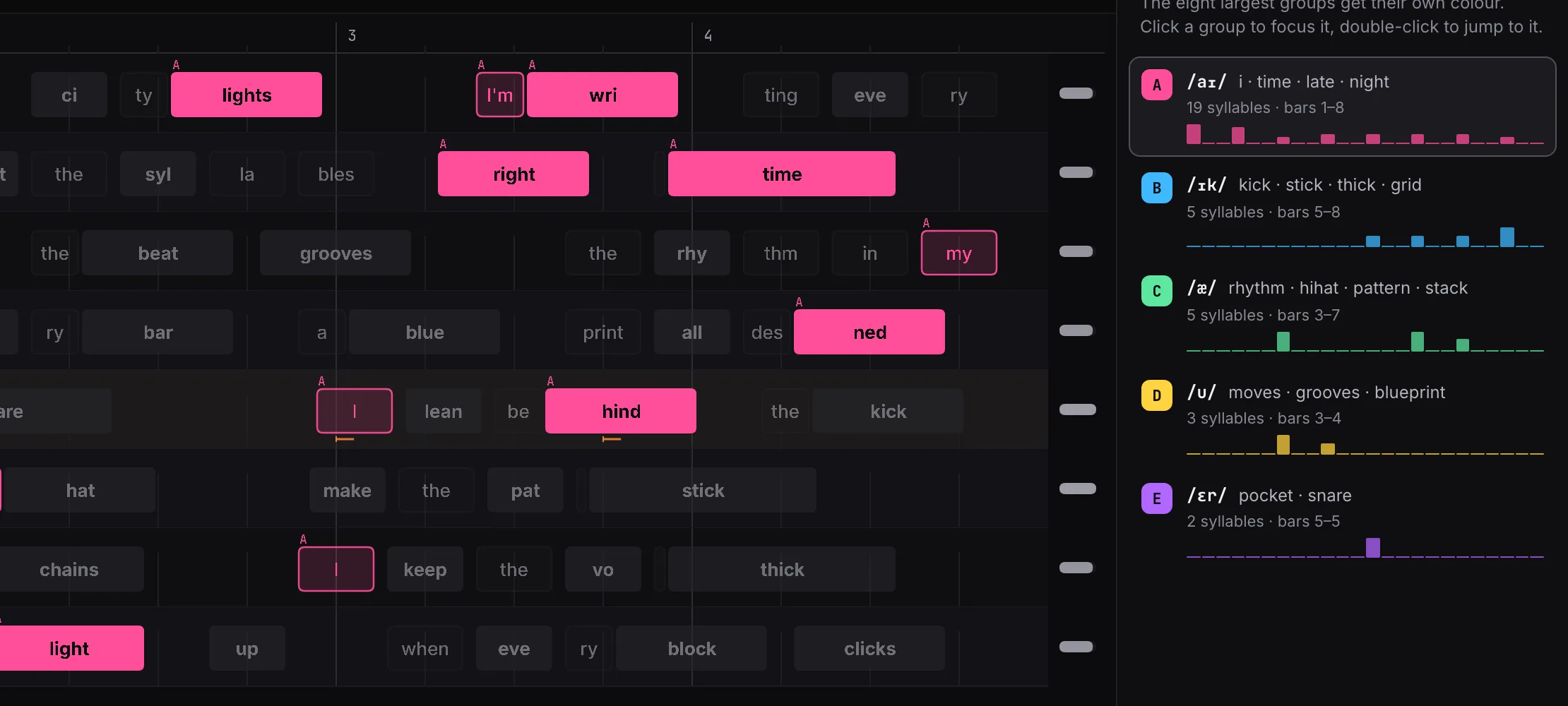
Flow grid with one rhyme group focused, next to the Rhymes panel listing each group's sound, example words and where it appears.
Report

Break it down, section by section.

The Report page puts every metric in one place, charts density and pocket across the whole track and splits it into sections. Click any bar on the chart to open it in the flow view, or any syllable on the grid to hear it.

  • Click-to-play with original mix or vocals only
  • Section table with density, sync, tempo and energy
  • Export the flow map as PNG or SVG
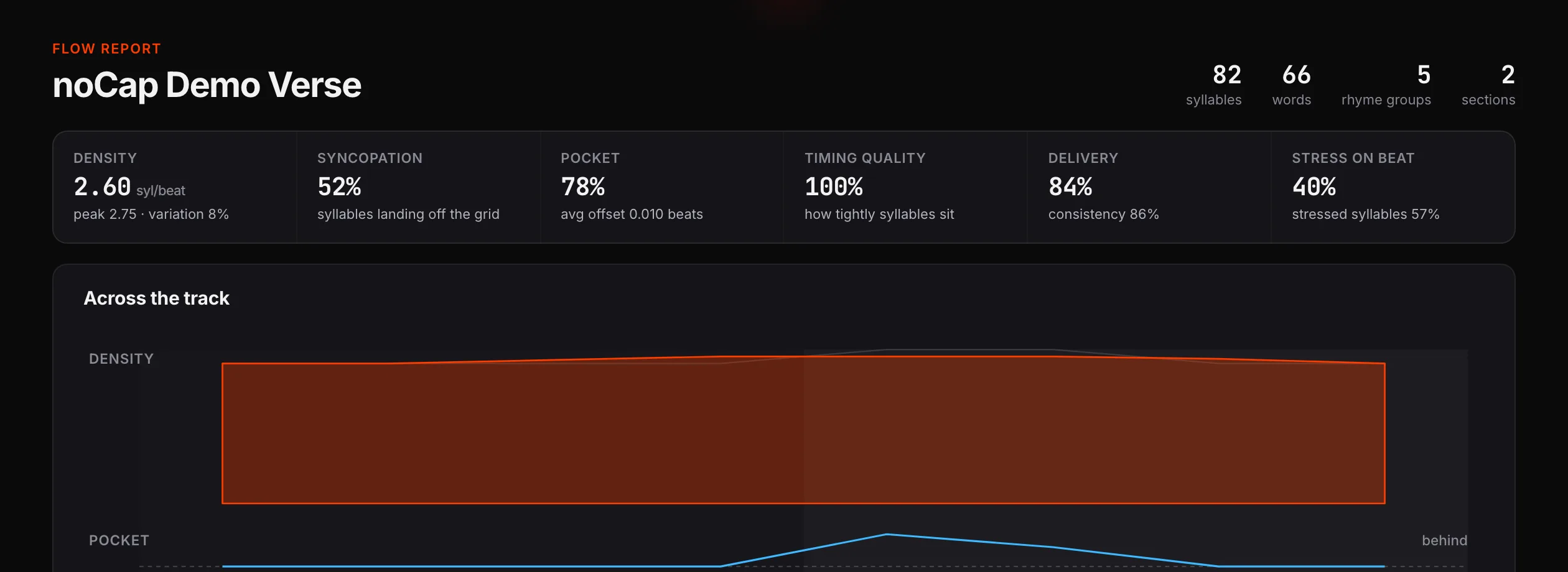
Report page with metric cards for density, syncopation, pocket, timing quality, delivery and stress on beat, above a chart of density and pocket across the track.

How it works

From audio file to flow map in four steps.

  1. 01

    Drop a track

    MP3, WAV, FLAC, AIFF, M4A or OGG. Beat grid and BPM are detected from the waveform.

  2. 02

    Isolate the vocals

    Demucs separates the vocal stem so the beat doesn't confuse transcription.

  3. 03

    Transcribe every word

    Whisper produces word-level timestamps, refined to roughly 10 ms accuracy.

  4. 04

    Snap to the grid

    Words are split into syllables with stress from the CMU dictionary and placed on the beat grid.

Who it's for

Made for people who study the pocket.

Rappers

Study the flows you love, then put your own takes next to them and compare density and pocket.

Producers

See where the vocal sits against your drums and which bars leave space for the beat to breathe.

Writers & critics

Back up a breakdown with real numbers and exportable visuals instead of adjectives.

Teachers & researchers

Show rhythm and rhyme structure visually, and work with open, inspectable data.

Open source

Hack on it.

noCap is a Python analysis pipeline with a React + Pixi.js front end, wrapped in Electron. Every source file stays under 200 lines, so it's easy to find your way around.

  • Python · Flask
  • React 19
  • TypeScript
  • Pixi.js 8
  • Electron
  • PyInstaller
Terminal
# clone
git clone https://github.com/fatihserhatturan/noCap.git
cd noCap

# python backend
python3 -m venv .venv && source .venv/bin/activate
pip install -e ".[dev,separator]" && pip install openai-whisper

# desktop app (Flask + Vite + Electron)
cd frontend && npm install
npm run desktop:dev

First analysis downloads the Whisper model (~1.5 GB) to ~/.cache/whisper/.

FAQ

Questions, answered.

Is it really free?

Yes. noCap is MIT-licensed open source. There's no account, subscription or usage limit.

Does my audio get uploaded anywhere?

No. Beat detection, vocal separation and transcription all run on your Mac. Tracks and analyses are stored locally in your library.

Which Macs are supported? What about Windows or Linux?

The current release is a self-contained build for Apple Silicon Macs. On Intel Macs, Windows or Linux you can run noCap from source today — see the developer setup. Prebuilt packages for more platforms are welcome as contributions.

Why is the download so large?

The app bundles everything it needs — Python, PyTorch, Demucs and the Whisper model — so it works offline with no setup. The trade-off is a big one-time download.

macOS says the app can't be opened. What do I do?

Right-click (or Control-click) noCap in Applications and choose Open, then confirm. You only need to do this once.

Does it work with lyrics in languages other than English?

noCap uses Whisper's English model and the CMU (English) pronouncing dictionary, so English-language tracks give the best results today. Multilingual support is on the wish list.

How long does an analysis take?

It depends on track length and your machine; separation and transcription are the heavy steps. Once analyzed, a track reopens instantly from your library.

Stop guessing. See the flow.

Free, open source, and running entirely on your Mac.